If ChatGPT traffic looks missing in GA4, check the source before changing your tracking. A report filtered to chatgpt.com / referral can miss sessions recorded with a different medium. Start with Session source, then inspect the medium and channel assigned to those sessions.
There is also a real limit: an analytics report cannot reliably identify an AI visit when the identifying information never reaches it. Reorganizing a report and collecting missing information are different jobs.
This guide walks through both, with a repeatable audit for SaaS founders and marketers who want to understand whether AI discovery is bringing useful visitors.
What changed in GA4's AI traffic reporting?
Google announced a native AI Assistant channel on May 13, 2026. For recognized assistant referrers, it assigns the medium ai-assistant and campaign (ai-assistant). Its announcement names ChatGPT, Gemini and Claude as examples. Older instructions that say GA4 has no AI channel are now outdated. Google Analytics release notes.
The current channel definition uses the medium ai-assistant. Google also explicitly excludes AI Overviews and AI Mode from this channel. Consequently, the AI Assistant row is not a measurement of every kind of AI discovery. Google's default channel definitions.
Before deciding traffic has fallen, check whether the definition of the report you are reading still matches the traffic you want to measure.
Start with a source-level check
- Open Reports → Acquisition → Traffic acquisition. If it is absent, ask a property editor to restore the report.
- Choose a completed date range, such as the previous 28 days.
- Change the table dimension to Session source / medium and search for
chatgpt. - Record every matching row. Do not keep only rows ending in
/ referral. - Inspect Session default channel group for the same period to see how the visits were categorized.
Google documents the report, source search and session dimensions in its Traffic acquisition guide.
Keep this exercise at session scope. First user source describes how a person was originally acquired, while session dimensions describe acquisition for individual sessions. Mixing them can make two correct reports appear inconsistent. Google's explanation of traffic-source scopes.
A reporting change can look like a traffic drop
Here is a hypothetical example, not BotSeen customer data:
| Report slice | Earlier period | Later period |
|---|---|---|
| ChatGPT source, referral medium | 80 sessions | 25 sessions |
| ChatGPT source, ai-assistant medium | 0 sessions | 70 sessions |
| ChatGPT source, other recorded media | 5 sessions | 5 sessions |
| All matching ChatGPT-source sessions | 85 sessions | 100 sessions |
The referral-only row falls by about 69%, but the total rises by about 18%. A dashboard that tracks only the first row would tell the wrong story.
Use the same source rule, date length and session metric in both periods. Then investigate real changes in the combined total.
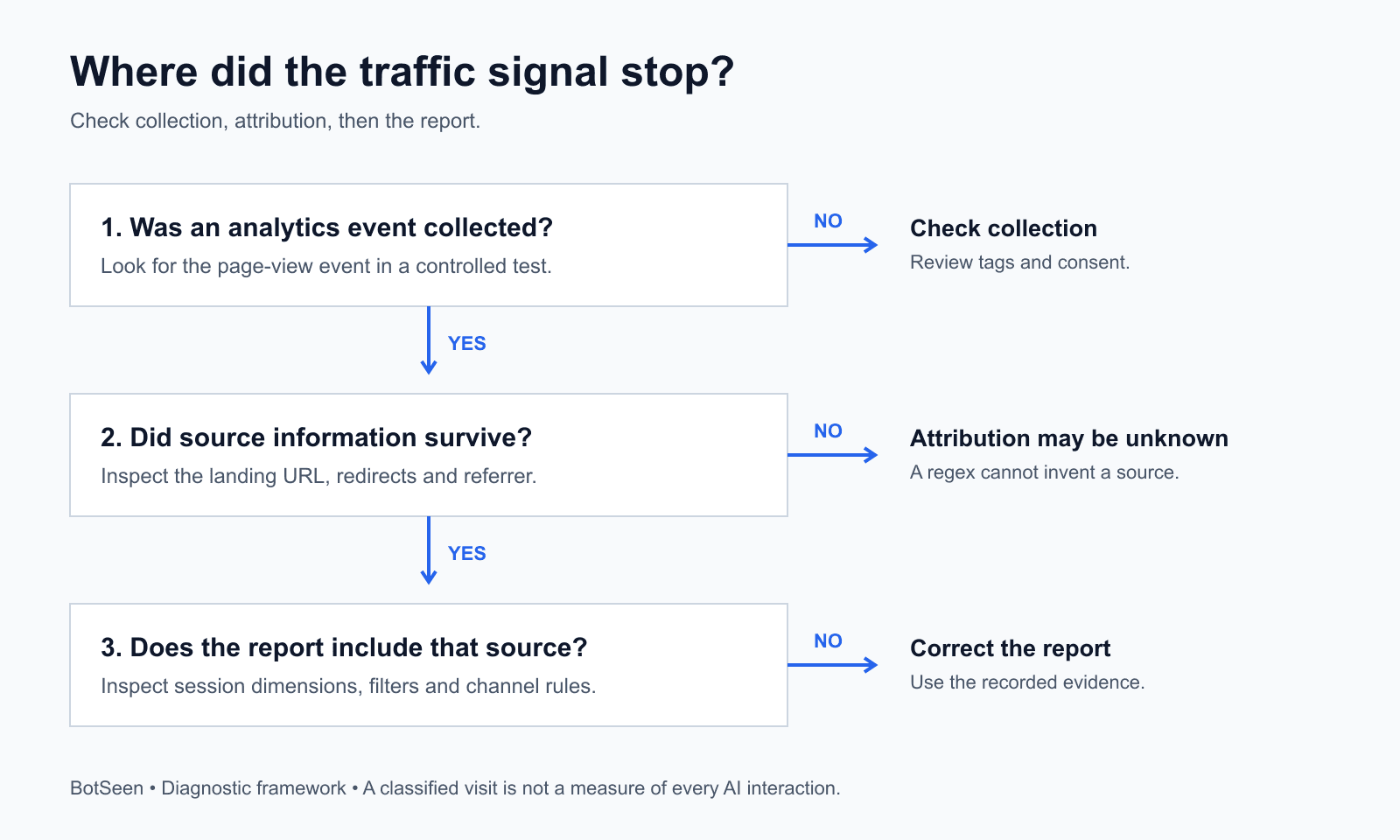
Diagnose which kind of information is missing
Use three questions in order:
| Question | If the answer is no | Next action |
|---|---|---|
| Did the visit produce an analytics event? | Collection may be the problem. | Check the tag and consent behavior. |
| Did useful source information survive? | Attribution may be unknown. | Inspect the landing URL and referrer. |
| Does your report include the recorded source? | The report may be too narrow. | Check dimensions, filters and channel rules. |
This is a troubleshooting framework, not a promise that every visit can be attributed. Record the evidence at each stage so you can hand a specific problem to whoever maintains your website.
1. Confirm that the event was collected
Use Google Tag Assistant or GA4 DebugView to check a controlled visit. Inspect the page-view event and relevant parameters. DebugView requires debug mode; it can also be affected by privacy controls or denied analytics consent. Google explains the setup in its DebugView documentation.
Run one test with analytics consent granted, where appropriate, and another using your normal consent flow. Respect the visitor's choice. A missing event under denied consent is not automatically a broken implementation.
For a clean attribution test, use a fresh browser session. GA4 does not start a new session each time a new campaign or traffic source appears during an existing session. Google's campaign and traffic-source documentation.
Do not treat a successful debug event as proof that the final acquisition report has finished processing. Google documents different processing intervals for reports; recent data can change as processing completes. GA4 data freshness.
2. Check the landing URL and referrer
OpenAI says ChatGPT search referral URLs include utm_source=chatgpt.com. That gives you a concrete item to inspect in a real click, rather than guessing from the channel name. OpenAI's publisher FAQ.
Record the URL immediately after clicking and after any redirects. Check whether the source parameter survives. Also inspect the page_location and page_referrer parameters in the debug event when available.
Test the path visitors actually use: an old article URL might redirect, a language selector might reload the page, or a sign-up flow might cross domains. Document where the useful information first disappears. Fixing a specific redirect is more actionable than reporting that “AI tracking is broken.”
A source value can exist even when another campaign field is missing. Google's tagging documentation notes that absent UTM parameters can produce (not set) values. That is another reason to avoid insisting on one medium during diagnosis. Manual tagging and traffic-source dimensions.
3. Review exclusions and filters
Check whether someone added an assistant domain to List unwanted referrals, or whether a report filter excludes the source. Google's unwanted-referrals setting controls which referring domains are ignored as referral sources; it is not a way to build an AI category. Google's unwanted-referrals guide.
Write down the existing configuration before changing it. Make one change at a time, repeat the same click test, and keep the before-and-after evidence.
Build a broader view of known AI sources
If you need a consistent multi-assistant report, create a custom channel group. You need Editor access or higher. In Admin → Data display → Channel groups, copy a group, add your channel and set its conditions. Channels are evaluated in order; place your new channel before other channels that could match. Select the custom group's session dimension when reporting. Custom groups can categorize historical report data that already exists. Google's custom channel group guide.
For an initial source rule, use Source → matches regex with this deliberately narrow starting list:
^(chatgpt\.com|chat\.openai\.com|perplexity\.ai|www\.perplexity\.ai|claude\.ai|gemini\.google\.com|copilot\.microsoft\.com|grok\.com|chat\.deepseek\.com)$
This is an editorial starting pattern, not Google's official recognition list. It matches those exact host-style source values. Inspect your own data and add verified variations; it will not match every subdomain, appended parameter or custom campaign label.
Avoid a catch-all expression such as .*ai.*: an unrelated source containing those letters could be counted. Do not add an AND medium = referral condition to this diagnostic view. Include only sources you have a reason to classify as assistants.
If you also include native AI Assistant traffic through a separate OR condition, count the resulting union once. Do not add overlapping native and custom report totals together.
Can a regex recover ChatGPT visits recorded as Direct?
Not when the identifying data is absent. A rule can classify an existing value; it cannot reconstruct an unrecorded source.
Google describes (direct) / (none) as traffic without a clear referral source. Causes include direct navigation and missing traffic information. Direct traffic is therefore not evidence, by itself, of hidden AI traffic. Google's guide to Direct traffic.
For example, if a prospect reads an AI answer, remembers your brand and types your address later, a domain-matching rule has no ChatGPT source to match. The practical response is to preserve future observable signals and supplement analytics with other evidence.
An optional “How did you first hear about us?” question can help. Keep self-reported discovery separate from measured session attribution: it captures memory, may refer to a different visit, and should not be silently added to a GA4 session total.
Similarly, do not multiply observed visits by an assumed “missing AI traffic” percentage. Without evidence from your own measurement process, that produces a confident-looking estimate with an unknown error.
Turn the audit into a useful weekly report
For each assistant and landing page, maintain a short record:
- Observed visits: sessions matching your documented source rules.
- Useful outcomes: the sign-ups, qualified enquiries or purchases you can actually verify.
- Tracking notes: redirects, consent changes and report-rule changes.
- Visibility evidence: which buyer questions showed your brand and which page was cited.
- Next action: one content, measurement or conversion improvement to test.
Define a useful outcome before reviewing the numbers. For a SaaS business, a qualified demo request may be more informative than a newsletter subscription. Keep both if they serve different purposes, but do not treat them as interchangeable.
Compare against your own baseline. If a page attracts visits but no qualified enquiries, check whether its promise matches the product and whether its next step is clear. If your brand rarely appears for relevant buyer questions, work on discovery before blaming the sign-up form.
Where BotSeen fits
GA4 helps analyze visitors who reach your website. BotSeen focuses on how AI answers describe your brand, where competitors appear, and what you can improve. Its workflow connects monitoring with diagnosis, draft fixes and testing. See BotSeen's AI visibility FAQ.
Use those two perspectives together. Choose one buyer question, inspect the answer and cited pages, make a specific improvement, and review both answer visibility and observed visits over time. A citation is not a visit, and a visit is not a customer; keep each outcome distinct.
Check your brand's AI visibility with BotSeen, then use this audit to understand what happens when people click through.
Frequently asked questions
Does a zero AI Assistant row mean nobody found us through AI?
No. First inspect the recorded sources and your report filters. Then test collection and attribution. If those checks are sound, the report may simply have no matching sessions in that period. It still cannot measure people who saw an answer and never visited.
Should I add ChatGPT UTMs to every link on my website?
No. Keep campaign labels truthful. Tagging ordinary internal links as ChatGPT would create misleading attribution. For links you deliberately distribute and control, document the actual source, medium and campaign. Google's campaign URL guide explains those parameters.
Is this a way to increase traffic immediately?
It is a way to make better decisions about traffic. Repairing a report can reveal visits you were overlooking, but it does not create new visitors. Use the findings to select a useful page improvement, then measure the result with consistent rules.
What should I do first today?
Export all ChatGPT-source rows for one completed period. Check whether your existing dashboard excludes any of them. If it does, correct that view; if it does not, run one controlled click test and record where the evidence stops.